
Studio wedding, 1938
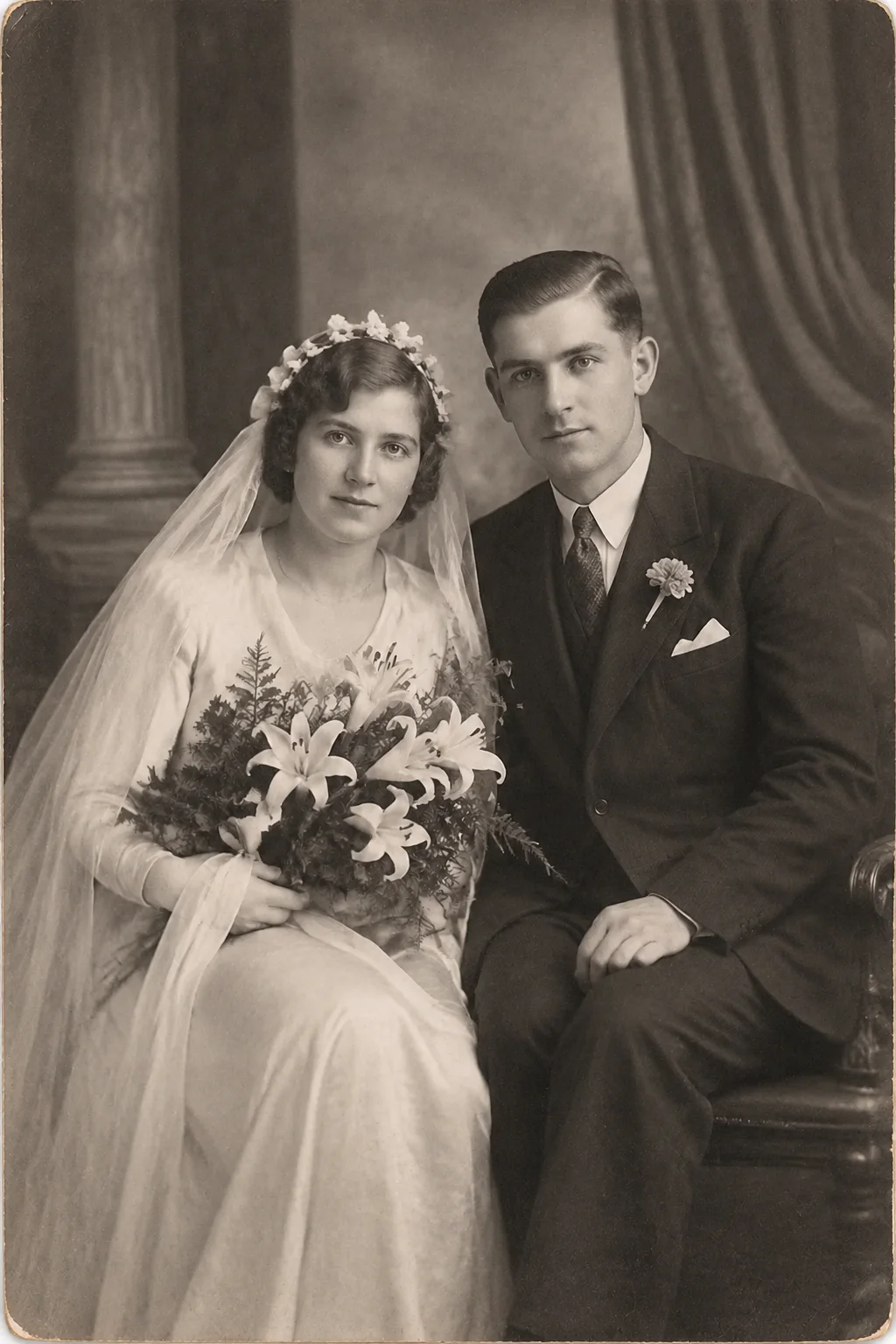
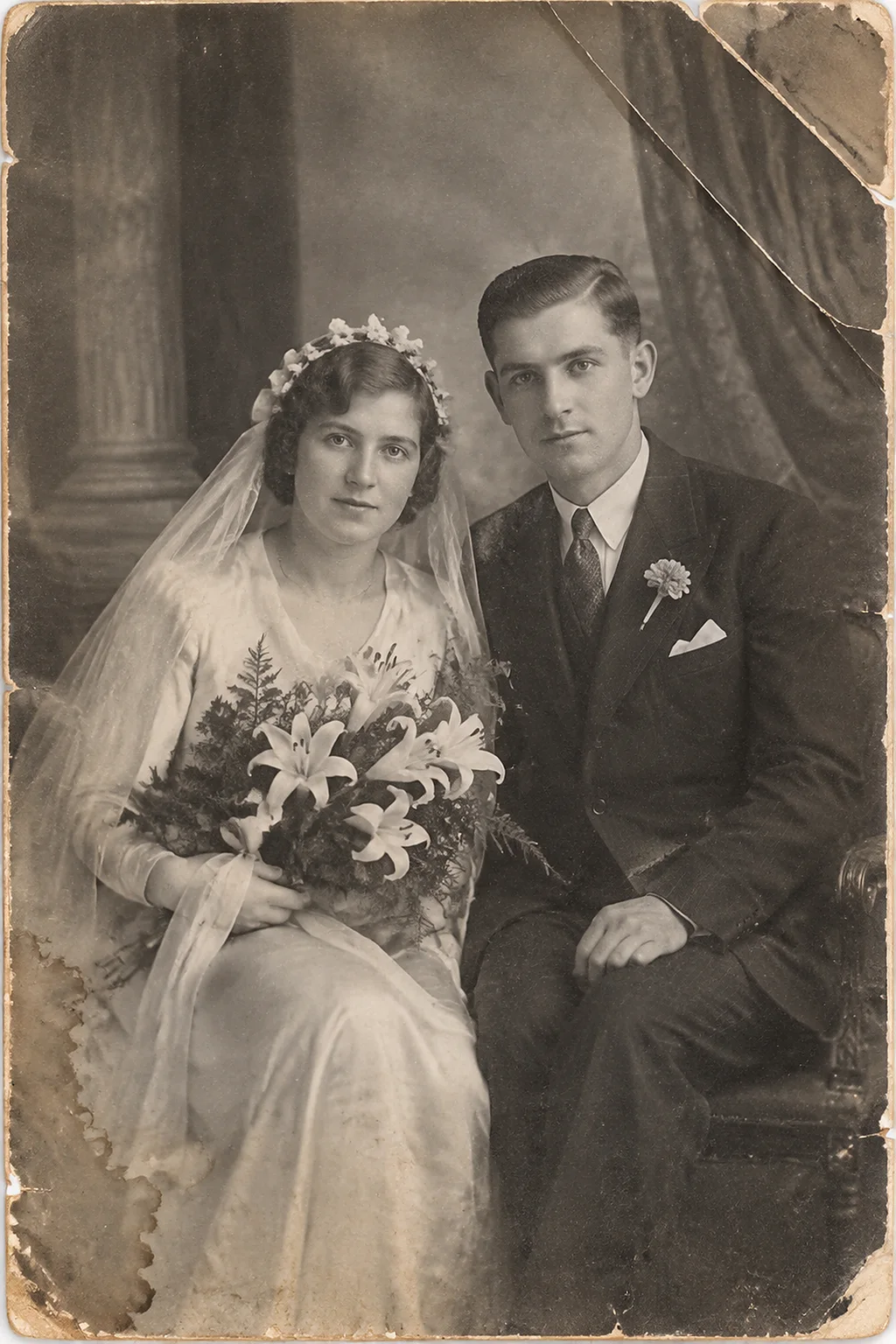
This photo was restored from a single upload using the Repair Damage mode. Drag the handle to compare the original with the result.
The rest of this page documents the process in full: what kind of photograph this is, the damage a conservator would recognise in it, exactly what the restoration pass was asked to do, and what actually changed between the two frames. Where something cannot be recovered, the page says so plainly.
 BeforeAfter
A wedding portrait that spent decades in an album: surface scratches, a bent corner and edge silvering. The repair pass inpaints the damage from surrounding detail and rebuilds the missing corner.
The photograph
This page is the record of one photograph: Studio wedding, 1938. Everything below — the era, the damage, the treatment — is read from the scan itself, not guessed from a template.
The wedding portrait was the one studio sitting almost every couple committed to, whatever the decade. Early examples were formal and half-length; later ones relaxed into something closer to reportage. Because wedding prints were displayed — on pianos and mantelpieces, in albums opened for visitors — they absorbed light, fingerprints and years of handling. Surviving prints typically show surface abrasion and a warm drift from aged paper, alongside the fine detail that professional lighting and large-format negatives captured on the day.
Dating a photograph starts with its process. Gelatin silver paper — the twentieth century's black-and-white standard — carries its image in a thin gelatin layer; the tonality and the damage pattern of this scan are consistent with the studio printing of the first half of the century.
Photographs from this era are usually gelatin silver prints, often studio-made. The damage is typically mechanical — bent corners, surface scratches, silvering at the edges — plus the general yellowing of aged paper. These restore cleanly because the detail underneath is usually intact.
Damage found and treatment applied
Old photographs fail in patterns that conservators can name. Reading the scan against those patterns is what gives the restoration its brief: repair what age actually caused, and invent nothing the evidence does not support.
- Silvering — a bluish metallic sheen in the shadows where silver ions have migrated to the print surface.
- General yellowing from residual processing chemicals reacting over the decades.
- Surface scratches and abrasion from loose storage and ordinary handling.
- Creases or bent corners where the print was carried, folded or pinned.
- Localised physical damage — tears, scratches or a missing corner — takes precedence over every tonal question and is treated first.
Tears, creases, scratches and silvering are inpainted from the surrounding image, stains are neutralised, and missing corners are reconstructed. The model only fills structure where the surrounding evidence supports it, which is why heavily damaged areas can stay slightly soft.
What the restoration recovered
- Structural continuity where the print was torn, creased or scraped.
- Reconstructed background detail in the missing corner, built from the scene's own perspective.
- A cleaned surface: stains neutralised, and the emulsion's original sheen respected.
The render used the professional finish: conservation plus studio-grade lighting and print fidelity, so the result reads like a professional portrait.
What the restoration did not do
Honesty about limits is part of the record. For this photograph, the line the restoration would not cross:
Reconstruction stops where the evidence ends. A rebuilt corner continues the scene's perspective and grain, but a lost face or a destroyed signature is not fabricated — those areas are filled with plausible texture and left deliberately soft. Repair restores the object's integrity; it does not restore moments the camera never captured.
About This Restoration
- Mode
- Repair Damage
- Model
- gpt-image-2
- Restored
Terms used on this page
- Gelatin silver print
- The standard black-and-white photographic paper of the twentieth century, its image held in metallic silver within a gelatin layer.
- Silvering (silver mirroring)
- A bluish metallic sheen, usually in the shadows, caused by silver migrating to the print surface as it ages.
- Inpainting
- Rebuilding damaged or missing image areas from the surrounding evidence — the digital equivalent of a conservator filling a loss.
Common questions
- Am I looking at the original photograph or an AI result?
- The original scan is untouched; the restored half is generated by the AI model. Nothing is redrawn by hand, the source file is never modified, and the page you are reading shows exactly what the pipeline delivered.
- Can I get this Repair Damage result for my own photo?
- Yes — upload your scan on the homepage and the same Repair Damage pipeline runs on it. The first preview is free, and you only pay if you want the full-resolution file.
- How long does a Repair Damage restoration take?
- Most Repair Damage jobs finish in under a minute. The result page appears as soon as the model is done, and the before-and-after pair stays in your account.
- How is this different from a hand-restored print?
- A retoucher works by hand for hours and makes hundreds of small judgement calls; the Repair Damage pass applies the same discipline — conservative reconstruction, no invented detail — in under a minute, and documents its limits on this page. The result is reproducible, and the original scan is never modified.
- Should I still keep the original photograph?
- Always. The restoration is derived from the scan; the original print is the primary record and is irreplaceable. Store it cool, dry and dark, and handle it by the edges.
- Is the result good enough to print?
- Yes — the delivered file is full resolution and suited to reprinting at the original photo's size or larger. Most families order one print for the wall and keep the digital master as the archive copy.
- What if my photo is damaged far worse than this one?
- Upload it anyway. The Repair Damage pass reports what it could and could not recover, and severe losses are reconstructed conservatively — a slightly soft area beats an invented one.
Caring for the original
Whatever the scanner captured, the original print keeps aging. The guidance for family collections is consistent across the preservation institutions:
- Store prints cool, dry and dark — a lived-in closet beats an attic or basement, and stability matters more than any exact number.
- Use acid-free sleeves and boxes, and never force apart prints that have stuck together.
- Scan at 600 dpi in colour, even for black-and-white prints — colour mode preserves the tonal evidence of age.
- Keep the lossless master (TIFF) and a working JPEG, with backups in two places.
- Gelatin silver prints are the ones that silver: keep them away from humidity swings and airborne pollutants, the two drivers of silver mirroring.
The preservation guidance on this page is checked against public institutions. These are the primary sources we cite across the site and in our guides.
Restore Your Own Old Photo
Upload a photo and get a free preview before you pay anything.
Restore a PhotoMore Restored Photos


Sources & further reading
The preservation guidance on this page is checked against public institutions. These are the primary sources we cite across the site and in our guides.