
AI Photo Restoration
AI photo restoration repairs the damage that time does to a print, then rebuilds detail that scanning destroyed. Upload an old photo and get back a clean, sharp, full-resolution file — without learning a single retouching tool.
It works on every kind of old photograph — faded colour prints, cracked studio portraits, water-damaged album pages — and every result can be downloaded in high resolution. Start with a free preview, then restore old photos one at a time or a whole album at once with credits that never expire.
Restore a Photo With AI
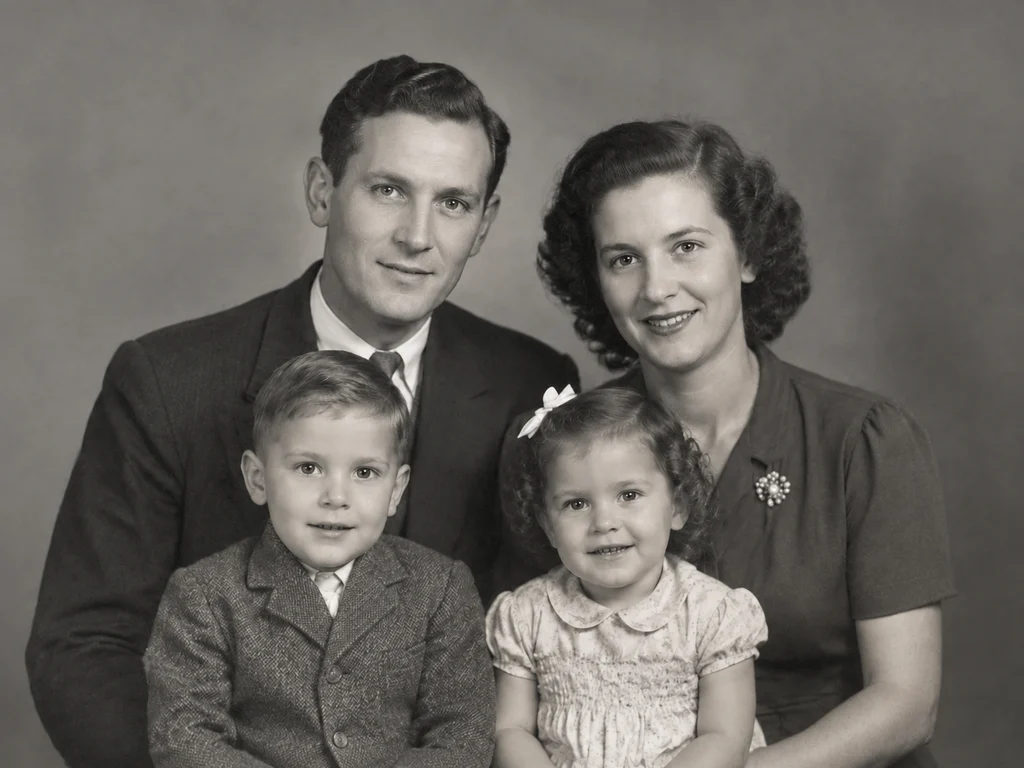
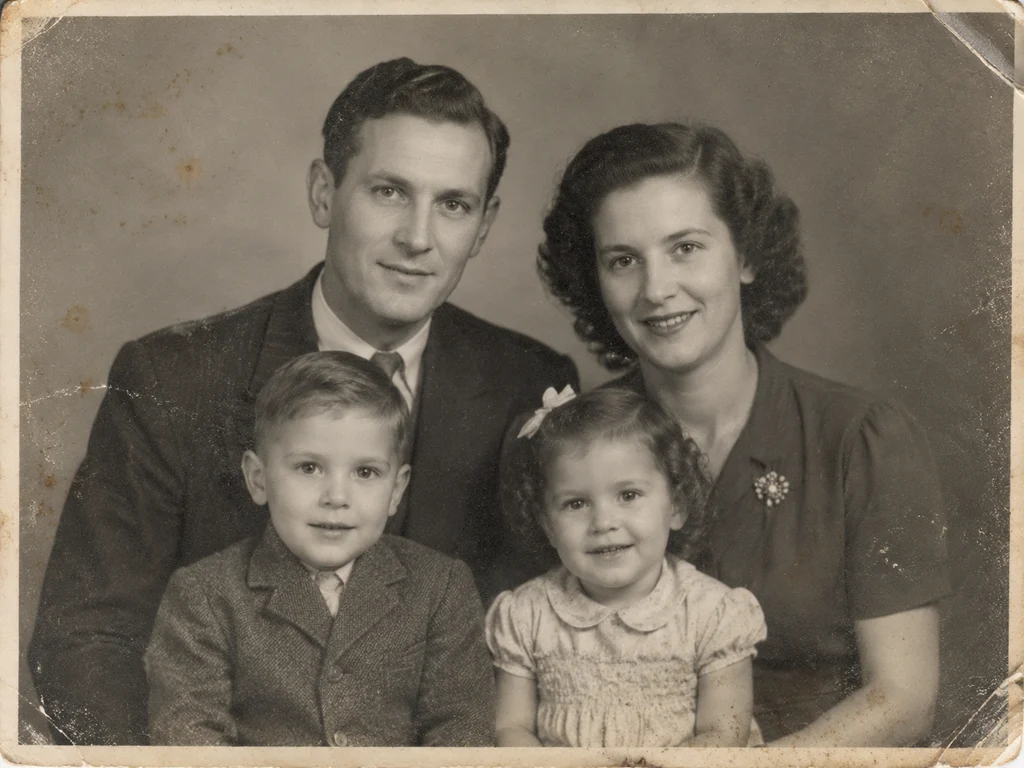 BeforeAfter
How Old Photo Restoration Works
Upload your old photo
Drop in a scan, a print photo or a phone snapshot of an album page. We accept JPG, PNG, WEBP and HEIC up to 20MB.
Pick a restoration mode
Choose restore, colorize, repair or animate. Each mode runs a model tuned for that specific kind of damage.
Download the result
Preview free at reduced resolution, then download the full-resolution file once you are happy with it.
AI Photo Repair and Upscaling
Restoration and upscaling run together. As damage is repaired the model also reconstructs fine detail — fabric weave, hair, foliage — at up to four times the original resolution, so the result is printable rather than merely viewable.
What AI Restoration Can and Cannot Fix
The model reconstructs missing areas from surrounding context, which works well for scratches, creases, dust and stains. It cannot invent detail that was never captured — a completely blurred face, or a region with no surviving information, will be a plausible reconstruction rather than a true recovery.
Batch Restore a Whole Album
Credit packs support batch upload, so a box of prints can be processed in one pass instead of one at a time. Every result keeps its own before-and-after view, making it easy to review a large set quickly.
High-Resolution, Print-Ready Downloads
Restoration runs at up to four times the scanned resolution, so the download is a full-size, high-resolution file — sharp enough for a framed print, a photo book or an archive submission. Detail that survives in the original, from fabric weave to handwriting on the border, is rebuilt rather than smoothed away.
The free preview shows the same result at reduced resolution so you can judge the work before paying; paid credits unlock the clean, full-resolution file with no watermark, in the aspect ratio your original has.
Old Photos for Genealogy and Family History
Restored photographs are the records genealogy work is missing. Census pages and certificates name your ancestors; only the photographs show them. Repairing and colourising a family collection turns names in a family tree into faces you can study — resemblances you might still recognise in relatives living today.
Libraries, genealogy societies and local history archives accept clean, high-resolution scans, and every download here is a full-size file you can deposit or share. Many families restore one photograph per generation — a set that makes a family history book feel complete.
- Put a face to a name in your family tree — restored portraits make ancestry research easy to share with relatives.
- Full-resolution downloads are accepted by genealogy societies, local archives and family history publications.
- Likenesses are preserved, not invented — important when a photograph is part of a documented family record.
FAQ
Frequently asked questions
- What does AI photo restoration actually fix?
- It rebuilds damaged pixel data instead of filtering it: scratches and tears are inpainted, blur and noise are reduced, and faded contrast is rebalanced. Faces stay recognisable because the model is trained on family photographs, not on generic images.
- Which mode should I choose for my photo?
- Pick Restore & Upscale for faded or blurry prints, Colorize for black-and-white photos, Repair Damage for scratches, tears or stains, and Animate to turn a portrait into a short video. You can re-run a photo in another mode at any time.
- Do I need to install software or learn editing?
- No. The tool runs in your browser — upload a scan or a phone snapshot, pick a mode, and download the result. There is nothing to install and no editing skills required.
- What does it cost?
- Your first preview is free at reduced resolution. A single full-resolution restoration is $4.90, and credit packs start at $14.90 — credits never expire and there is no subscription.
- What resolution are the downloads?
- Restorations upscale up to 4× the original scan, producing high-resolution files suited to the sizes family photographs are usually framed at. The free preview is the same image at reduced resolution; paid credits unlock the full-size file.
- Is AI restoration suitable for genealogy and archive work?
- Yes — restored images keep their original framing and likeness, and full-resolution downloads can be deposited with genealogy societies or local history archives. Batch credits help when a whole family collection needs consistent treatment.
Sources & further reading
The preservation guidance on this page is checked against public institutions. These are the primary sources we cite across the site and in our guides.